Monday, March 10, 2008

Wheelies

"Wheelies: Under new management" from SLNN.com

Simon Walsh, founder of Wheelies Nightclub, announced Sunday that he was resigning his role as overall manager of Wheelies Nightclub. Wheelies Nightclub has been an important fixture in Second Life for many, one that Mr. Walsh has worked tirelessly to build.
Our very own, Polgara Paine has become the Director of Wheelies.
Ms. Paine has been active in Second Life since May 2005. She is a professor of special education at the School of Intervention Services at Bowling Green State University. During the transition, Wheelies will continue at a temporary location. Moving forward, Ms. Paine intends to establish a board of directors and to raise funds to make Wheelies sustainable on a long-term basis. The first fundraising event is scheduled to take place on March 17th, St. Patrick’s Day as part of a grand opening of their new space.

Saturday, March 8, 2008

Tips for getting around


To have your students share locations they find in SL they can do it several different ways:

To save a location (called a landmark)
:
  1. Click on World in the main menu bar
  2. Click 'Create landmark here'
  3. A window will open showing the info of the landmark including it's name (at the top of the window). That landmark can be found under the landmarks folder in your inventory or found by typing the location name into the inventory search bar.

To create a list of landmarks:
  1. Open your inventory and click 'Create'
  2. Then select 'New note'
  3. A new notecard window will open. Drag the landmarks you would like to use in your list into the notecard. Textures, snapshots, and other notecards may also be dropped into a notecard.
  4. Finally, rename the notecard by right-clicking (or crtl/ cmd+click) on it in your inventory. Select rename.

To create a list of landmarks using the SLURL system (Second Life URL):
  1. Open the map by clicking on the map button on your toolbar.
  2. Click 'Save location to clipboard'. This SLURL may be pasted into a notecard (crtl/cmd+V) or entered into a document on your computer or in your internet browser (where you may then save to your bookmarked favorites or del.icio.us account).

Friday, February 29, 2008

SL Network Issues

You may have noticed some increased performance when using Second Life on campus over the last several days (I know we did well at our meeting on Tuesday!). Chris Wammes, our ITS LC member emailed me the other day:

We have worked with our networking software vendor to target Second Life traffic on our network and give it a higher priority. This should solve the latency issues that you have been experiencing when using Second Life on campus. Please forward this information on to the SLLC and any other users of Second Life.

And added:

We have added rules to... our packet shaping software, to identify Second Life traffic based on Second Life subnets and the ports that they are listening on.

We would like to thank Chris and ITS for making these improvements. If you continue to have problems with lag on campus be sure to submit a ticket (and CC me) so we can diagnose the problem.

PS. The client of Second Life has a 'Lag Meter' composed of simple red, yellow, green lights that you can use to determine where a lag problem is coming from. These lights indicate whether the Client, Network, and Server are running at normal. Here's a video tutorial on performance by Torley Linden:


Wednesday, February 13, 2008

Feb 12th. - Lance R. Williams

On Feb. 12th, 2008 Professor of Computer Science Lance R. Williams from the University of New Mexico gave a demonstration of his work with the programing language Scheme in Second Life to the BGSU SL Learning Community.


The learning community was thoroughly impressed with Prof. Williams work with "distributed computation in the area of CS which deals with dividing the pieces of a computation up and distributing them across many computers which communicate over a network." Williams has built and scripted all of his work in Second Life at the BGSU sandbox. "SL is an ideal testbed for research in dist. computation because of its programming model... scripts are tiny...and limited to 16K, which is many thousands of times less memory than most comp. scientists are used to working with." By distributing the algorithms and data structures across hundreds of different objects, the 16K limit for a single script can be overcome."

Williams showed three different evaluators for the Scheme programming language. Each evaluator was comprised of hundreds of scripted objects which communicate with each other to effect the computation. Learning community members were very interested in the artistic nature of what Williams calls the "reification" of the programs, or the physical embodiment of something which is normally purely abstract. One of the virtual machines William's presented to the learning community resembled a school of swimming fish which was not simply a visualization of a distributed data structure, but literally the data
structure itself; the functional elements of a distributed virtual machine,
operating wholly inside the virtual world of Second Life.

Wednesday, February 6, 2008

Monday, February 4, 2008

What do phones have to do with it?

I would just like to call your attention to the video below. This is a demo of an phone using the open android platform (or the google phone). Please fast forward the video to 4:25 to see the phone running the video game Quake, who's graphics are on the same level as Second Life.


Tuesday, January 29, 2008

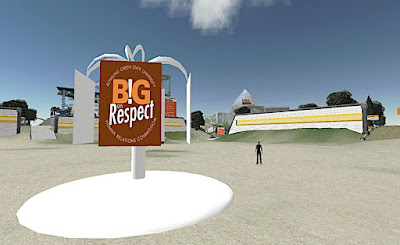
B!G on Respect - Sandbox Rules


The B!G on Respect campaign continues in our Sandbox. Running a sandbox, or public building space, in Second Life may seem like a daunting task. Users must respect each other's space and abide by the rules. One of the things that makes our sandbox a great place to socialize and work is the level of respect each user gives one another. Our new slogan, "B!G on Respect," will stay posted in the sandbox to promote a high level of courtesy towards our fellow Second Life resident.